
Caching in Next.js 16: use cache, cacheLife and cacheTag
 André Luiz Vieira7 min read
Caching in Next.js has always felt like a black box. In 13 and 14, fetch cached everything without asking. In 15, it stopped caching by default. Along the way you had revalidate, dynamic = 'force-static', unstable_cache and next: { tags }, each with its own rules.
Next.js 16 folds all of that into one explicit model: nothing is cached until you write 'use cache'. This post shows how the three pieces (use cache, cacheLife and cacheTag) fit together, and where people usually trip.
Step one: turn on Cache Components
The new model sits behind a flag that replaces the old experimental.ppr:
// next.config.ts
import type { NextConfig } from 'next'

const nextConfig: NextConfig = {
  cacheComponents: true,
}

export default nextConfig
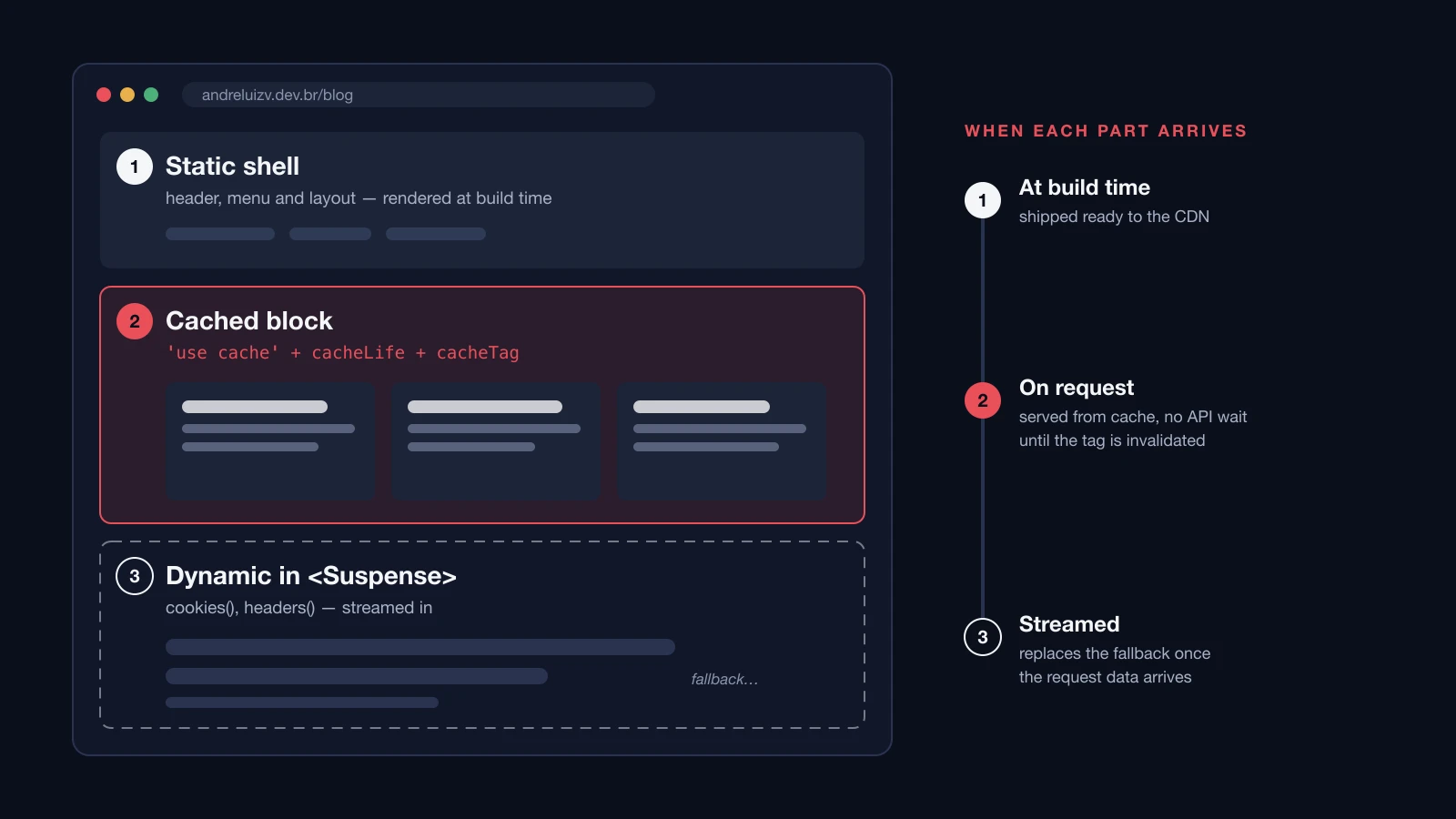
With the flag on, every part of a page falls into one of three buckets:
- Static: synchronous code and imports, rendered at build time.
- Cached: async data marked with
'use cache'. - Dynamic: anything that depends on the request (
cookies(),headers(),searchParams), wrapped in<Suspense>.
Next builds a static shell, fills it with what's cached and streams in the dynamic part. That's Partial Prerendering, no longer behind an experimental flag.
use cache: what goes into the cache
The directive works at three levels: file, component and function. I prefer data functions, because it's obvious what's being stored:
// lib/posts.ts
import { cacheLife, cacheTag } from 'next/cache'

type PostSummary = {
  slug: string
  title: string
  date: string
}

export async function getPosts(locale: string): Promise<PostSummary[]> {
  'use cache'
  cacheLife('hours')
  cacheTag('posts', `posts-${locale}`)

  const response = await fetch(`https://api.example.com/posts?locale=${locale}`)
  if (!response.ok) {
    throw new Error(`API responded ${response.status}`)
  }
  return response.json()
}
Notice there's no cache key anywhere. Next builds it from the build ID, the function and its serializable arguments. getPosts('pt') and getPosts('en') are two separate entries with zero extra work. If you've ever maintained a keyParts array for unstable_cache, you'll appreciate this.
cacheLife: how long the data stays valid
Without cacheLife, the default profile applies. The built-in profiles are 'seconds', 'minutes', 'hours', 'days', 'weeks' and 'max'. When none fits, pass the three timings yourself:
import { cacheLife } from 'next/cache'

export async function getExchangeRate(currency: string): Promise<number> {
  'use cache'
  cacheLife({
    stale: 60, // the browser reuses its local copy for up to 1 minute
    revalidate: 300, // after 5 minutes, the server refetches in the background
    expire: 3600, // after 1 hour without traffic, the entry is gone
  })

  const response = await fetch(`https://api.example.com/rates/${currency}`)
  const data: { rate: number } = await response.json()
  return data.rate
}
| Setting | Who it affects | What happens when it runs out |
|---|---|---|
stale | the browser | asks the server again |
revalidate | the server | serves the old copy, refetches in the background |
expire | the server | drops the entry; the next request waits for fresh |
cacheTag: name it so you can purge it
Time-based expiry covers the common case. But when someone publishes a post, you don't want to wait an hour. That's what tags are for: you label the entry and invalidate it by name.
Next 16 splits invalidation into two functions, and picking the wrong one is the most common mistake:
'use server'

import { revalidateTag, updateTag } from 'next/cache'
import { savePost } from '@/lib/db'
import { requireAdmin } from '@/lib/auth'

export async function publishPost(locale: string, slug: string, mdx: string): Promise<void> {
  await requireAdmin()
  await savePost(locale, slug, mdx)

  // the author needs to see the new post in this same response
  updateTag(`posts-${locale}`)
}

export async function importPosts(): Promise<void> {
  await requireAdmin()
  // ... bulk import

  // nobody is waiting: serve the old copy and refresh in the background
  revalidateTag('posts', 'max')
}
updateTag: expires immediately, and the same request reads fresh data. Server Actions only. Use it for "I saved, show me".revalidateTag: marks the entry stale and refreshes it in the background (stale-while-revalidate). Also works in Route Handlers, so it's the one for webhooks. In 16 it expects a second argument with the profile; the single-argument form is deprecated.
The cache you can't see
A lesson I learned on this very site: Next's cache isn't the only one in the chain. The blog reads posts from a separate API, tagged posts, with a webhook that calls revalidateTag on every publish. Fine on paper. Still, a freshly published post kept returning 404.
The cause: the API sent s-maxage=60, stale-while-revalidate=300. The webhook invalidated the tag, the site refetched right away… and got the pre-write copy from the API's CDN. That stale copy then stuck around for another hour.
// ❌ Wrong: the origin API cached on its CDN, underneath Next's cache
reply.header('Cache-Control', 's-maxage=60, stale-while-revalidate=300')

// ✅ Correct: Next is the only caching layer; the origin always answers fresh
reply.header('Cache-Control', 'no-store')
cacheTag purges Next's cache, not everyone else's. If there's a CDN, a proxy or a database cache in between, invalidation has to reach all of them. Or only one layer caches.
Common mistakes
Reading cookies inside the cache
// ❌ Wrong: cookies() inside 'use cache' throws
async function CartSummary() {
  'use cache'
  const cartId = (await cookies()).get('cart')?.value
  const cart = await getCart(cartId)
  return <p>{cart.items.length} items</p>
}

// ✅ Correct: read it outside and pass it in (it becomes part of the key)
async function CartPage() {
  const cartId = (await cookies()).get('cart')?.value ?? 'anon'
  return <CartSummary cartId={cartId} />
}

async function CartSummary({ cartId }: { cartId: string }) {
  'use cache'
  const cart = await getCart(cartId)
  return <p>{cart.items.length} items</p>
}
Using revalidateTag when the user expects to see the change
// ❌ Wrong: the author saves and the screen still shows the old version
revalidateTag(`post-${slug}`, 'max')

// ✅ Correct: in a Server Action, read-your-own-writes
updateTag(`post-${slug}`)
Non-deterministic values inside the cache
// ❌ Wrong: the time is frozen at the moment the entry was created
async function Footer() {
  'use cache'
  return <p>Generated at {new Date().toLocaleTimeString('en-US')}</p>
}
✅ If the value must change on every request, keep it outside 'use cache', in a dynamic component inside <Suspense>.
Forgetting the tag
❌ Caching with cacheLife('days') and no cacheTag. ✅ If the data changes because someone acts on it, it needs a tag. Otherwise your only options are waiting or redeploying.
When to use / when to avoid
| Situation | What I'd do |
|---|---|
| Post lists, catalogs, docs pages | 'use cache' + cacheLife('hours') + tag |
| Data changed by an admin action | tag + updateTag in the Server Action |
| Webhook from a CMS or another API | revalidateTag(tag, 'max') in Route Handler |
| Cart, session, per-user data | dynamic in <Suspense>, no cache |
| Exchange rates, scores, live stock | cacheLife('seconds') or dynamic |
Origin already behind an s-maxage CDN | pick a single layer to cache |
Next steps
- Turn on
cacheComponents: truein a branch and run the build: the errors point exactly to dynamic access without<Suspense>. - Replace each
unstable_cachewith a'use cache'function, movingtagstocacheTagandrevalidatetocacheLife. - For every
cacheTag, ask: who invalidates this, and does the user need to see it right away? The answer picksupdateTagorrevalidateTag. - Check your origin's headers. If the API sends
s-maxage, you have two caches and you're only purging one.

André Luiz Vieira
Frontend & Mobile Engineer
I live in Curitiba, Brazil, and I've spent five years building React and React Native products for banks, credit unions and e-commerce. Here I write about what I learn along the way.
Join the conversation
Questions, ideas or a different take? Comments run on GitHub Discussions; sign in with GitHub to post.